touchAttachment
Touches an attachment of the bot (HUD or wearable object).
Bot.touchAttachment(objectName, linkNumber);Input
Variable | Required | Description |
|---|---|---|
| yes | The name of the object to touch. |
| yes | The link number of the prim (root prim = 1). |
Output
Function returns a Promise with the following data:
Variable | Type | Description |
|---|---|---|
| bool | True if command completed successfully. |
| string | Error string if command has failed. |
Return value
If the object is not found, the bot returns
result.success = falseand an error message inresult.error(use.then(function(result)to catch this).If
linkNumberis invalid (less than 1 or greater than the number of child prims), the function returns success but no touch occurs.
Comments
Remember that the bot must load all objects from Second Life before touching them. Therefore:
After logging in, give the bot about 30 seconds to load surrounding objects.
Do the same after teleporting.
Determining the link number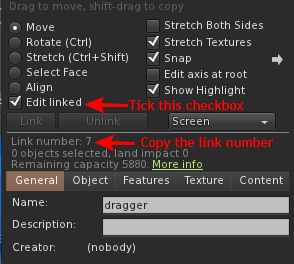
The root prim is always 1 (so linkNumber = 1 for single-prim objects as well).
To get the link number of a specific child prim, use the Phoenix Firestorm Viewer:
Start editing your object.
Check the “Edit linked” option.
Select the required child prim.
See the “Link number” value.
Examples
Touch a special test attachment object (contact SmartBots support to get it):
// Touch the button of the "Touch tester v2.0" object:
Bot.touchAttachment("Touch tester v2.0", 2);

// Gracefully exit since we're done

exit();