touch_attachment
Touches an object attached to the bot (HUD or attachment).
The attached object is being selected by name, and the button to be clicked - by link number.
Variables
The following table shows input values (you send them with the API call) and returned output values.
Input basic parameters
Variable | Required | Description |
|---|---|---|
action | yes | = touch_attachment |
apikey | yes | Your personal developer's API key. |
botname | yes | Your bot's SL login. |
secret | yes | Bot access code of your bot. |
dataType | optional | Set to "json" to get JSON reply instead of URL-encoded string |
custom | optional | The custom data (string) to be passed back to caller script. This value will be returned back to the caller in HTTP response. |
Input
Variable | Required | Description |
|---|---|---|
objectname | yes | the name of the attached object (exact, including all spaces) |
linkset | yes | the link number of the object to touch. See the "Comments" section below. |
Output
(to be received in http_response LSL event, see docs for details)
Variable | Description |
|---|---|
result | OK - command completed successfully |
resulttext | Detailed reason for the failure. |
custom | The value from input "custom" parameter. See above. |
Additional resulttext values are available:
OBJECT NOT FOUND - The attachment object you've specified was not found
LINK NOT FOUND - The object has been found, but it contains less prims than your "linkset" value
Comments
1. Determining the link number
If your HUD has several buttons, determine the link number. Use Firestorm or a similar viewer, edit object and get the link number:
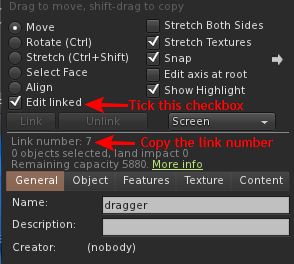
The link number of the root prim is always "1".
Single-prim objects are also have linkset=1
2. IMPORTANT: Data availability
Please note that bot loads all nearby prims within 10-20 seconds after startup. Thus, wait a bit after logging in your bot to issue this command.
Examples
Bot locates the "Weapons HUD" on his screen and clicks the button at linkset 15:
action=touch_attachment&objectname=Weapons%20HUD&linkset=15