send_notice
Sends a notice to the group.
This API command applies only for Standard bot
Variables
The following table shows input values (you send them with the API call) and returned output values.
Input basic parameters:
Variable | Required | Description |
|---|---|---|
action | yes | = send_notice |
apikey | yes | Your personal developer's API key |
botname | yes | Your bot's SL login. |
secret | yes | Bot access code of your bot. |
dataType | optional | Set to "json" to get JSON reply instead of URL-encoded string |
custom | optional | The custom data (string) to be passed back to caller script. This value will be returned back to the caller in HTTP response. |
Input:
Variable | Required | Description |
|---|---|---|
groupuuid | yes | the UUID of the group |
subject | yes | the subject of the notice (can't contain international characters) |
text | yes | the text of the notice (can contain international characters) |
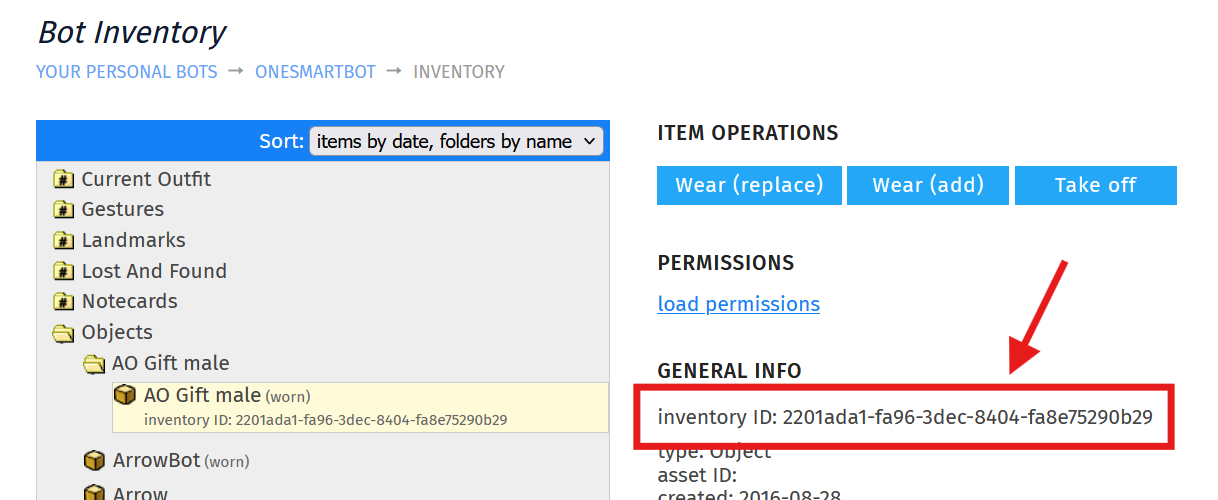
attachment | optional | inventory UUID of the attachment (see below) |
autodelay | optional | set to "1" if you are sending multiple notices at once, and want bot to make automatic delays between them. See "Sending multiple notices" below. |
Output:
(to be received in http_response LSL event, see docs for details)
Variable | Description |
|---|---|
result | OK - command completed successfully |
resulttext | Detailed reason for the failure. |
custom | The value from input "custom" parameter. See above. |
Comments
This command does not return FAIL if your bot has no "Send Group Notice" ability. Pay attention to bot's group permissions while using this command.
The notice delivery is guaranteed even if the bot is offline (the invitation will be sent after bot comes online).
Sending multiple notices
If you are sending multiple notices (more than 3 within 3 seconds) SL may silently discard your notices as spam.
To avoid this, use the autodelay=1 parameter. It tells bot to add automatic delays between the notices. The delay depends on bot's activity:
3 consequent notices within 5 seconds are allowed,
then delay of 3 seconds before each notice is required.
Example
string sbApiKey="...";
string sbBotName="Fashion Firethorn";
string sbBotAccessCode="nskndKgfa-243js";

key httpReq=NULL_KEY;

default {
    touch_start(integer total_number) {
        string params = llDumpList2String([
            "action="  + "send_notice",
            "apikey="  + llEscapeURL(sbApiKey),
            "botname=" + llEscapeURL(sbBotName),
            "secret="  + llEscapeURL(sbBotAccessCode),
            "groupuuid="  + "877d11f0-72ad-649e-3ba2-96185b72d345",
            "subject=" + llEscapeURL("Notice subject"),
            "text=" + llEscapeURL("Notice text goes here")
            ],"&");

        httpReq=llHTTPRequest("https://api.mysmartbots.com/api/bot.html",
            [HTTP_METHOD,"POST"], params);
    }
}
Attachments
The notice attachment can be taken from the bot's inventory. To make an attachment, proceed with the following steps:
Set copy+transfer permissions to the object (so bot can give it with notice)
Drop object to the bot in Second Life
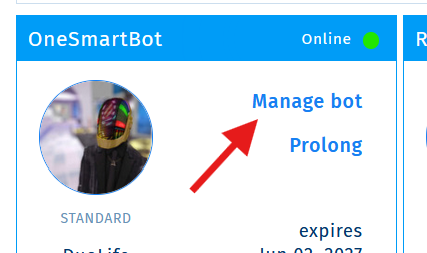
Open SmartBots account, click "manage bot"
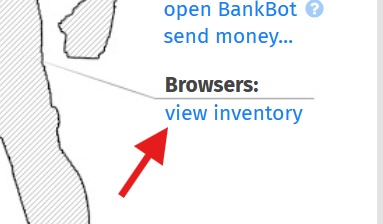
Open bot's inventory browser
Copy the "inventory UUID" of the required inventory item.